What's hogging it
While he's sweating or dizzy, the busiest processes by GPU, CPU or memory, each with an End task that asks first and won't touch Windows itself.
Live vitals for every part of your PC, what's hogging it, what starts with Windows and the developer clutter eating your drive. No admin rights, and nothing leaves your PC.
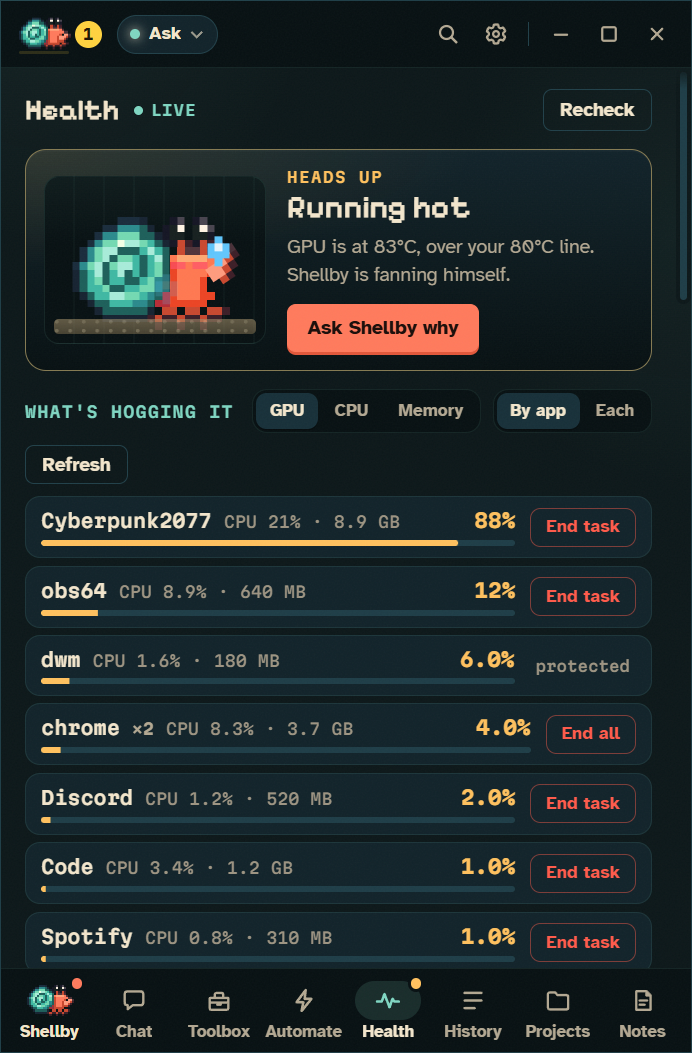
He sweats past 80°C, pants under a heat shimmer when it gets scorching, gets dizzy when memory fills up, and overstuffs his shell when a drive is full. He waits out a spike before he reacts, and you set every line yourself.




GPU and CPU temperature and load, VRAM, memory, every drive, drive temperatures, fans and the battery, with sparklines over the last 10 minutes or the last hour.
Windows hides it, so he reads it from LibreHardwareMonitor or HWiNFO. Let Claude set it up writes the install task for you to read first.
One notification when something crosses the line, another only if it gets worse, and a log of the last 40 alerts.
He owns up to his own share: Shellby himself: 1% CPU, 450 MB.
While he's sweating or dizzy, the busiest processes by GPU, CPU or memory, each with an End task that asks first and won't touch Windows itself.
Every startup entry, with a Switch off that works like Task Manager's, so switching it back on puts things as they were.
What Docker, WSL's virtual disks and the npm, pnpm, pip, Cargo and Gradle caches are sitting on. Tens of gigabytes.
Why it's hot, what's running that you don't need, what's safe to clear. Each is a Claude task that reports back.
He never deletes, kills or switches anything off himself.
And nothing leaves your PC.
Free for Windows 10 and 11. Bring your Claude Pro or Max plan, or just keep him for company.